


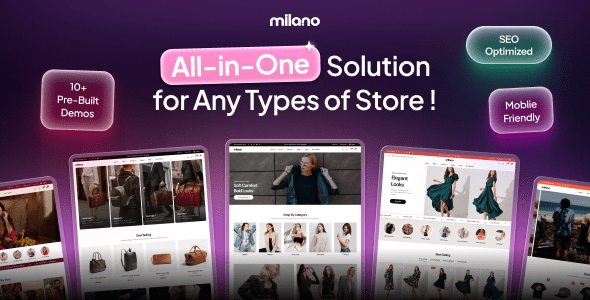
Preview Milano – Multipurpose WooCommerce WordPress Theme
Milano is a modern WooCommerce WordPress theme engineered for online stores
that need to convert. Built from the ground up for eCommerce, it ships a complete stack of
sales-driving features — FOMO tools, a slide-out cart drawer, visual variation swatches,
smart product recommendations, and a drag-and-drop header/footer builder — all without
requiring paid add-on plugins. Whether you are launching a fashion boutique, a home goods
store, or a multi-niche marketplace, Milano gives you a professionally designed starting
point and the flexibility to make it your own.
What Is Milano?
Most multipurpose themes hand you a layout and leave the selling tools to paid add-ons.
Milano ships them in the box. 90+ built-in features and tools replace more than 25 premium
plugins — tools that would otherwise cost you ~$1,620 per year purchased separately.
With Milano, it is all included in one theme purchase.
Demo Library
Milano ships with a growing library of professionally designed, one-click import demos.
Each demo includes pre-built pages, sample products, customizer settings, header and footer
layouts, and widget configurations — so you can go from a blank install to a fully
populated store in an afternoon.
- Fashion & Apparel — editorial grid layouts, lookbook pages
- Home & Furniture — warm, lifestyle-oriented design
- Cosmetics & Beauty — elegant, product-forward styling
- Sports & Outdoor — bold typography, high-energy layouts
- Jewelry & Accessories — minimal, luxury feel
- Electronics — structured, spec-heavy product presentation
- New demos are added with each update
Convert & Create Urgency
Milano ships a full conversion toolkit — urgency cues, social proof signals, and
trust elements — so you can increase order rates without adding a single extra plugin.
- Urgency countdown banner — countdown bar at cart and checkout: “Checkout within {countdown}”
- Sale countdown timer — live timer to the sale’s end on product pages and shop cards
- Live visitors counter — “12 people are viewing this right now”
- Sold-count social proof — “22 sold in the last 16 hours”
- FOMO banner — recently-purchased / scarcity nudge on cart and checkout
- Live sale notifications — toast pop-ups of recent or simulated sales for FOMO — “Sarah from London just bought…”
- Free shipping progress bar — “Spend $20 more for free shipping”
- Buy Now button — skip the cart, go straight to checkout
- Sticky Add-to-Cart bar — the buy button follows the shopper as they scroll the product page
- Safe-checkout guarantee — trust message and payment icons displayed below the buy button
- Trust badges on cart — reassurance badges row at the cart level
- Product badges — automatic Sale, New, Pre-order, and Sold-out labels with custom text support
Product Discovery & Browsing
Help shoppers find the right product faster with a full suite of discovery tools —
all integrated and theme-styled.
- AJAX live search — instant suggestions with trending and suggested keywords
- AJAX product filters — fast faceted filtering without page reloads; sidebar or modal position
- Quick View modal — preview a product without leaving the shop page
- Quick Add to Cart — add from the shop grid in one click
- AJAX add-to-cart — no page reload when a product is added to cart
- Recently viewed products — slider of products the shopper has already browsed
- Related & upsell carousels — smart product suggestions with custom intro text
- Complementary products — hand-picked “pairs well with” carousel
- Load-more / infinite scroll — seamless pagination with URL updates
- Column switcher — let shoppers choose 2, 3, 4-column or list view; preference is saved
- Featured categories — category showcase section above the product grid
Rich Product Media
Let customers see every detail of what they are buying. Milano supports multiple
product media formats and a rich gallery experience out of the box.
- Advanced product gallery — slider, stacked, grid, or masonry layouts
- Image zoom + lightbox — hover zoom and full-screen viewer (PhotoSwipe + Drift.js)
- Product video in gallery — self-hosted, YouTube, or Vimeo
- 360° product viewer — interactive spin view
- 3D / AR product viewer — GLB model with augmented reality support
- Variation & color swatches — visual swatches on product cards and product pages
- Variation compare modal — browse all variants by image in a side-by-side modal
- Linked variations — show each variation (e.g. every colour) as its own catalog product, linked together with swatches
- Size guide — per-product or per-category size charts on the product page
Cart & Checkout
Reduce drop-off between product and payment with a polished, feature-rich cart experience.
- Slide-out cart drawer / mini-cart — off-canvas cart shoppers can open from anywhere
- Edit cart items in drawer — change quantities or variations without leaving the current page
- Cart cross-sell slider — recommended add-ons displayed inside the cart drawer
- Catalog / showcase mode — hide prices and disable purchasing to use your store as a product catalog
Header, Footer & Navigation
A visual drag-and-drop builder gives you complete control over every header and footer
layout — no Elementor required, no PHP files to edit.
- Drag-and-drop header builder — visual desktop and mobile layouts, no code needed
- Drag-and-drop footer builder — flexible rows and columns with widget sidebar support
- Mega menu — grids, tabs, icons, badges, and widget areas in the navigation
- Announcement top bar — multi-position bar with countdown and currency/language switchers
- Sticky header — always visible, on scroll-up only, or off
- Off-canvas mobile menu — tabbed categories drawer for mobile shoppers
- Mobile bottom navigation bar — app-style fixed bar for home, shop, cart, account, and wishlist
- Browser-tab flash — re-engage idle visitors with a pulsing browser tab title
Header builder components you can drag and drop into any row:
- Logo (with alternate logos for tablet and mobile)
- Primary menu, secondary menu, mobile menu
- Search bar
- Cart icon (opens slide-out drawer)
- Wishlist icon
- Account menu / login dropdown
- Currency switcher
- Language switcher (WPML)
- Contact info (phone, email, address)
- Social links menu
- Custom HTML block
Page & Content Building
Milano ships 35+ custom Elementor widgets and a full Theme Builder so you can design
every page of your store visually — no Elementor Pro subscription required for the
core template system.
- Popup Builder — targeted popups with triggers, frequency controls, and animations
Included Elementor widgets (requires free Elementor):
- Product carousel, product grid, product list
- Lookbook
- Shoppable video
- Banners and slideshow
- Countdown block
- Sale block
- Testimonials
- Brands marquee
- Blog posts
- Icon boxes and image boxes
- FAQ accordion
- Mapbox map
- Copy-coupon button
- And more — 35+ widgets total
Store Customization
A comprehensive WordPress Customizer with real-time preview covers every corner of your
store. No coding skills needed to make Milano look exactly like your brand.
- Live Customizer — colors, typography, spacing, border radius, and shadows with instant preview
- Multiple product-card styles — switch card designs in a click (Modern, Standard)
- Custom product tabs — global, per-category, or per-product tabs in the product information section
- Product Q&A — “Ask a question” form on the product page
- Enhanced product reviews — richer review display with media support
- Model information — reusable model/fit profiles shown on product pages
- Store information + payment icons — phone, email, hours, address, and payment method badges
- Blog layouts — grid or list
- Social share + brand label — share buttons and product overline/brand category
Typography & Fonts
- Google Fonts, WordPress web fonts, and custom font upload
- Independent font controls for headings, body text, and accent elements
- Font size scale — Small, Normal, Medium, Large, XL, Huge
Colors & Theming
- Global color palette with per-element overrides
- Preset color schemes — Default, Dark, Green — switch with one click
- Individual controls for backgrounds, text, headings, links, borders, buttons, and badges
Layout Control
- Product grid column count (2–6 columns) and card thumbnail aspect ratio
- Sidebar position options for shop and blog
- Responsive breakpoint customization
- Dedicated mobile customizer section for mobile-specific overrides
Integrations & Global Features
- Wishlist — save-for-later across product cards, product pages, and Quick View
- Product compare — side-by-side specification comparison table
- Variation swatches engine — color, image, and label swatches across the entire store
- Multi-currency switcher — shop and pay in local currency with automatic exchange rates
- Multilingual + RTL — full translation support with automatic right-to-left layout
- Responsive / performance — mobile-first, inline critical CSS, fast by default
Plugin Compatibility
Milano is built to work alongside the WordPress and WooCommerce plugin ecosystem.
The theme follows WordPress coding standards and uses only native hooks and APIs,
so it stays compatible as plugins update. Where a supported plugin is detected as
active, Milano automatically enables the relevant integration — no manual
configuration needed.
The theme has deep built-in support for wishlist, variation swatches, product
comparison, currency switching, and multilingual plugins. It is also fully
compatible with popular page builders, form plugins, SEO tools, performance
optimizers, and caching solutions commonly used in WooCommerce stores.
A setup wizard helps you install a curated set of recommended free plugins on
first run. Beyond that, Milano does not depend on any specific third-party plugin
to deliver its core features — everything listed on this page is built in.
Toggleable Feature Modules
Milano and its companion plugin (Milano Addons) ship a library of self-contained
modules you can enable or disable from the theme dashboard — no code required.
Each module is independent: toggling one has no effect on the rest of the theme.
Only activate what your store needs.
-
Browser Tab Notifications —
Flash the browser tab title to re-engage visitors who have left your page. -
Variation Compare —
Adds a “Compare” button on variable product pages that opens a modal
to browse variation images filtered by a primary attribute such as Color. -
Product Card Swatches —
Shows variation images or plugin swatches on product cards in the shop loop. -
Buy Now —
Add a Buy Now button to WooCommerce products to skip the cart and go directly to checkout. -
Catalog Mode —
Transform your WooCommerce store into a product showcase by hiding prices and disabling purchasing functionality. -
Complementary Products —
Display a curated set of products that pair well with the one being viewed to boost cross-selling and average order value. -
Free Shipping Bar —
Display a progress bar on the cart page showing customers how close they are to qualifying for free shipping. -
Mega Menu —
Build advanced mega menus with grid layouts, tabbed interfaces, icons, and custom content widgets. -
Model Information —
Manage reusable model profiles and display product-specific model information on WooCommerce product pages. -
Popup Builder —
Build and display targeted popups with Elementor. Control triggers, layout, frequency, and animations. -
Product 360° Viewer —
Display an interactive 360° product viewer inside the product gallery by uploading an ordered set of rotation frames. -
Product 3D Viewer —
Display an interactive 3D product viewer inside the product gallery by uploading a GLB file and a poster image. -
Ask a Question —
Add an “Ask a question” button and popup to product pages, using a built-in email form or your own form shortcode. -
Product Tabs —
Manage WooCommerce product tabs: reorder, enable or disable default tabs, and create custom tabs with global, category, or product-specific visibility. -
Product Video —
Display a product video inside the product gallery by uploading a video file or entering a YouTube or Vimeo URL. -
Size Guide —
Add customizable size guides to WooCommerce products with category-based assignment and multiple display options. -
Back to Top —
Add a button to quickly scroll back to the top of the page.
New modules are added with each update.
Easy Setup
An interactive setup wizard guides you from installation to a fully populated store:
- Step 1 — Install & Activate: run the setup wizard and install recommended plugins with one click
- Step 2 — Import a Demo: browse the demo library and import a complete store — pages, products, settings, and widgets included
- Step 3 — Customize & Launch: swap in your logo, brand colors, and products, then publish
Support & Updates
- Dedicated support via the ticket system
- Comprehensive documentation with step-by-step guides and video tutorials
- Regular theme updates with new demos, features, and compatibility fixes
- Item comments monitored for common questions
Changelog
Version 1.0.1
- Fix the issue with plugin installation.
Version 1.0.0 — Initial Release
  - Initial public release
  - Full WooCommerce integration with conversion feature suite
  - Visual header and footer builder
  - Demo library with one-click import
  - Elementor integration with 35+ custom widgets
  - Toggleable module system
  - RTL and multilingual support
Note: If you are having trouble with Milano – Multipurpose WooCommerce WordPress Theme Nulled free Download, try to disable AD blocking for the site or try another Web Browser. If disabling AD blocker or change Web Browser not help to you please contact us.


